How to Write a Sound Effect Prompt
You don’t need audio skills to get a great sound out of AI Sound Effects. You need a clear description, and a few well-chosen words go a long way.
Written by AI Sound Effects Team5 min readUpdated
AI Sound Effects turns a description of 3 to 250 characters into a new sound effect between 1 and 12 seconds long. Your words are the main thing the AI works from, so a specific prompt gives it far more to go on than a single word.
Here’s how to describe a sound, add the right details, set Duration and Creativity, and what to try when a result isn’t quite right.
Name what makes the sound, what it’s doing, and where it is, in one short English sentence, then adjust Duration and Creativity only if you need to.
Name what makes the sound
Start with the thing that makes the sound: thunder, a campfire, a robot, a car door. “Rain” works, but “heavy rain on a tin roof” tells the AI exactly which rain you mean.
Then add what it’s doing. Words like crackling, crashing, whooshing, or rumbling describe how the sound moves, and they shape the result as much as the subject does.
Add the setting and the details
Where a sound happens changes how it sounds. A door slam in an empty hallway rings out; the same slam outdoors fades fast. Add a place or a distance when it matters: in a cave, far away, up close.
Layer one or two extra sounds when you want a scene instead of a single effect, like the app’s own idea “Ocean waves crashing with distant seagulls.” Keep it to one short sentence; a long list of sounds is hard to fit into one clip.
| Instead of | Try | What it adds |
|---|---|---|
| Rain | Heavy rain on a tin roof | The surface and the strength |
| Door | Old wooden door creaking open slowly | The material and the motion |
| Explosion | Distant explosion with a long rumble | The distance and the tail |
| Robot | Robot footsteps with servo whirs and metallic clicks | The parts you hear |
Start from an idea
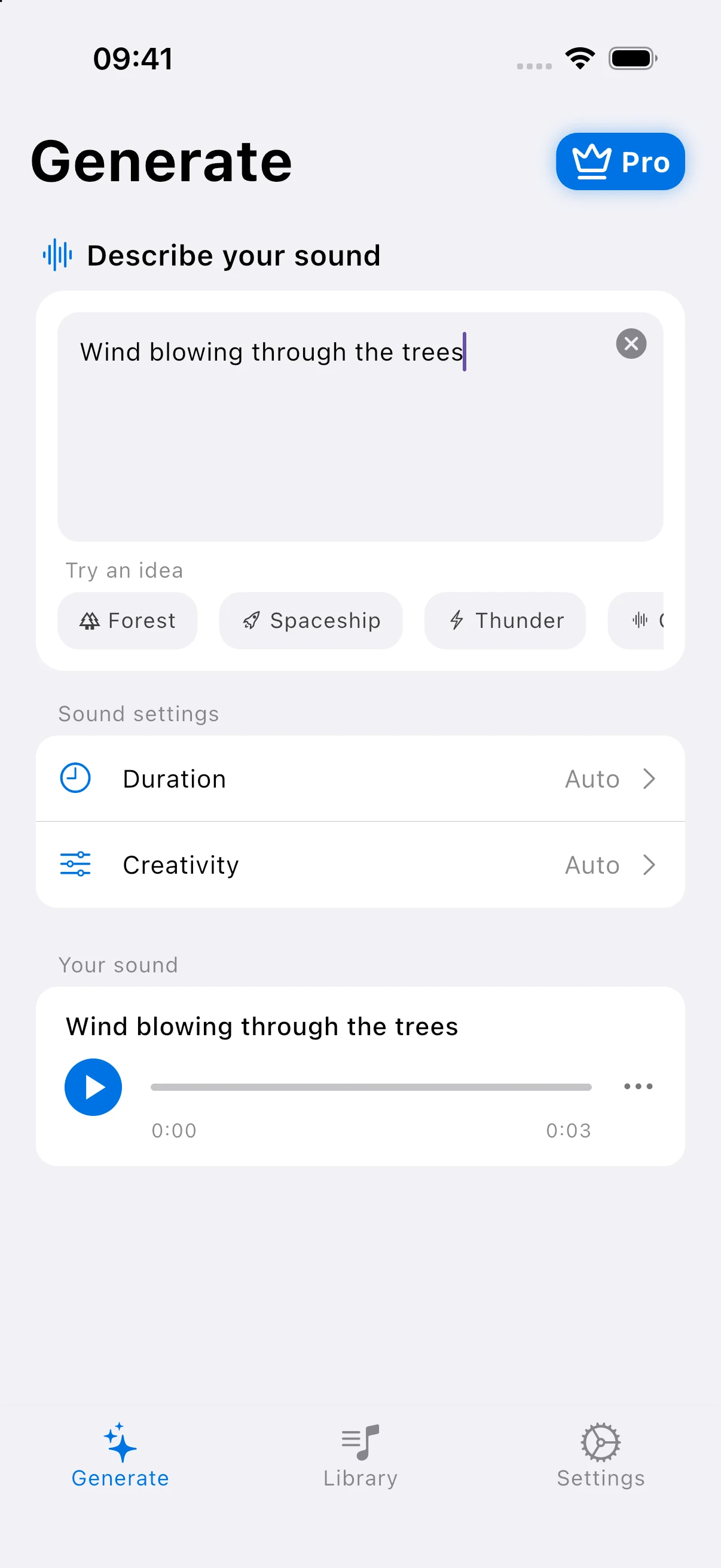
Not sure where to begin? Under Try an idea on the Generate screen, tap Forest, Spaceship, Thunder, Ocean, Portal, Campfire, City, or Robot to fill in a ready-made prompt.
Then make it yours. Change a word or two, like swapping “gentle breeze” for “strong wind,” and generate again to hear the difference.
Write it in English
Prompts work best in English. If your description is in another language, the app warns you that it may produce poor results. You can still continue, but translating the key words first usually gets you closer to the sound you imagined.
Set Duration and Creativity
Both settings start on Auto, and for most prompts that’s all you need. Open Duration to pick a length from 1 to 12 seconds when a sound has to fit a cut in your video or a moment in your game.
Creativity sets how closely the AI follows your words. Lower values stay closer to your prompt; higher values add more creative variation. Try a lower value when the result drifts away from what you asked for.
Check your prompt
Before you tap Generate, check:
- Does it name what makes the sound?
- Does it say what the sound is doing?
- Did I add a place or a distance if it matters?
- Is it one short sentence in English?
If the result isn’t what you imagined, change one thing at a time and generate again. Every sound is saved to your library, so you can play the versions back and keep the best one.
Frequently Asked Questions
How long can a sound effect prompt be?
A prompt can be 3 to 250 characters long. One clear sentence is usually enough: name what makes the sound, what it’s doing, and where it is. Prompts that list many different sounds are harder to fit into a single clip of up to 12 seconds.
Can I write my prompt in another language?
You can, but English prompts work best. When your description isn’t in English, AI Sound Effects warns you that it may produce poor results and lets you continue anyway. Translating the key words, like the source and the action, usually gives you a result closer to what you had in mind.
What if my sound effect doesn’t match my prompt?
Make the prompt more specific first: name the source, add an action word, and mention the setting. Then try a lower Creativity value so the AI follows your words more closely. Change one thing at a time and generate again, so you can hear which change made the difference.
Will the same prompt give me the same sound twice?
Not necessarily. Each sound effect is generated fresh from your prompt, so running the same description again can give you a different take. That’s handy when you want options: generate a few versions, play them back in your library, and keep the one that fits your project best.
Turn words into sound
Download AI Sound Effects, describe any sound you can imagine, and hear it in seconds.